Default friend
A single portrait gets a default female friend for the complete two-person story. A two-person photo uses the two people pictured without adding anyone. You can also upload a second authorized portrait to choose your friend.
Fancy Cafe AI (fancy-cafe.com) is an independent, fan-made tool that turns one photo of you into an AI-generated cafe meme video: 15 seconds in vertical 9:16 by default (480p, Seedance 2.0 Mini; 8 credits). Packs start at $6.99 for 10 credits. Generation requires credits; no trial credit allowance or generated preview is promised. Watch the existing examples before buying. Choose your settings, review the quote and generate.
🎤 Making your fancy cafe video? Open the step-by-step tool page1Add your photo
A single portrait gets a default female friend for the complete two-person story. A two-person photo uses the two people pictured without adding anyone. You can also upload a second authorized portrait to choose your friend.
2Pick a scene
Scenes
Reference examples. Your result will vary.
3Pick quality & length
480p costs 8 credits; a direct 720p render costs 14. If the finished video supports a 1080p upscale, estimate 4 more (12 total). Available upgrades and the final quote depend on its actual dimensions and duration.
This selection: 8 credits. Basic estimates: up to 12 videos/month for $29.90, or 50/year for $100.00, at the default Seedance 2.0 Mini, 480p, 15s, 9:16 (8 credits/video). Other settings change the video count.
Solo, best-friend and couple versions of the cafe POV.
All examples: 4 / 4
One person, solo version
Two friends, two-person version
Two people, couple version
One person, solo version
The meme
Fancy Cafe AI is a browser tool for one viral joke: “POV: your first time in a fancy cafe”. The shared joke is a visitor mistaking a small table for a seat. Our studio creates a new interpretation: your character enters a minimalist cafe, struggles with wall perches and ends on the low step with an awkward smile. The scene is generated from your photo and a written recipe, so the action and likeness can vary.
Nothing has to be filmed and no real cafe is needed. The room, the light and the movement are generated from your photo and a written scene. You review the credit quote, generate, and download the clip from My videos.
Short answer: Fancy Cafe AI turns one clear photo of you (and, if you like, one of a friend) into a new video (15 seconds and 9:16 by default, with other lengths and formats available) of the “first time in a fancy cafe” meme, generated from your photo and a written scene.
Make the classic first time in a fancy cafe clip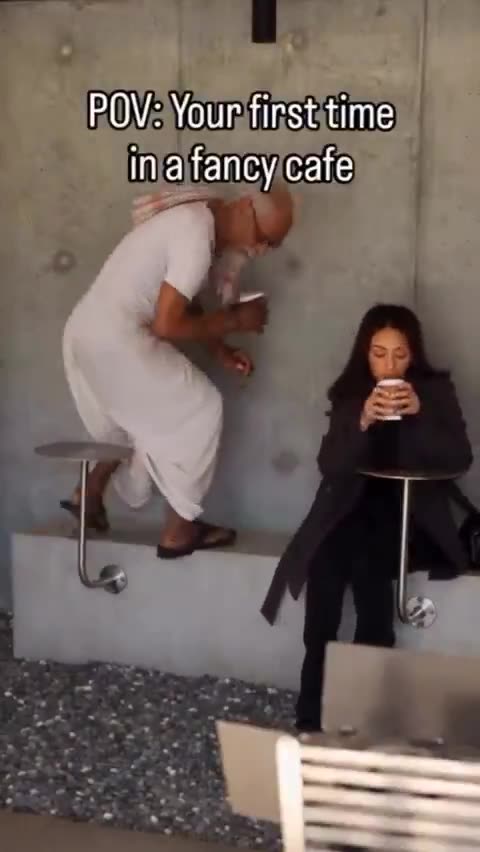
How it works
The whole flow happens on this page. There is nothing to install and no editing timeline to learn.
Use one clear, front-facing photo of yourself in the left slot. Good light and a visible face give the most faithful result. Add a friend (optional): Put a second person in the right slot if they agreed to take part. They sit calmly on another perch sipping coffee while you struggle.
The studio shows the credit cost before anything runs. How long generation takes depends on the AI provider queue; you can leave the page and find the result in My videos.
Save your clip (9:16 by default, with other formats available) and share it on TikTok, Reels, Shorts or X.
Versions
A single portrait gets a default female friend for the complete two-person story. A two-person photo uses the two people pictured without adding anyone. You can also upload a second authorized portrait to choose your friend.
Two photos. Your friend sips coffee on a perch as if it were normal while you panic.
Two photos. A calm partner, a confused date, one tiny shelf-table between you.
Download your clip (9:16 by default, with other formats available) and post it on TikTok, Reels, Shorts or X with your own caption. Caption ideas are on the fancy cafe POV page.
Fancy Cafe AI is a browser tool for one viral joke: “POV: your first time in a fancy cafe”. The shared joke is a visitor mistaking a small table for a seat. Our studio creates a new interpretation: your character enters a minimalist cafe, struggles with wall perches and ends on the low step with an awkward smile. The scene is generated from your photo and a written recipe, so the action and likeness can vary.
Nothing has to be filmed and no real cafe is needed. The room, the light and the movement are generated from your photo and a written scene. You review the credit quote, generate, and download the clip from My videos.
The whole flow happens on this page. There is nothing to install and no editing timeline to learn.
The recipe asks for three moments: enter with a takeaway cup and notice the wall perches; try a perch and struggle to place the cup; then move to the low step and look at the camera. This is the intended sequence, not a guarantee that every generated clip will reproduce each movement exactly.
The cafe is a newly generated minimalist room with grey concrete walls and slim wooden pillars. The scene requests a handheld phone-video look; camera movement and framing can vary between generations.
Fancy Cafe AI runs on the web: open the page on your phone or laptop, upload a photo and generate. There is no app to install, and your finished videos stay in your account so you can download them again later.
The default clip is a 15-second, 9:16 video at 480p made with Seedance 2.0 Mini, the vertical shape TikTok, Reels, Shorts and X use for full-screen posts. You can pick other models, resolutions, lengths and formats, and the studio shows the credit price before you generate.
A single portrait gets a default female friend for the complete two-person story. A two-person photo uses the two people pictured without adding anyone. You can also upload a second authorized portrait to choose your friend.
The model can only keep what it can see. A few small choices make a visible difference.
The appeal is a small, recognizable mistake: looking confident in an unfamiliar place, then realizing you misunderstood something obvious. Read what fancy cafe means for the phrase, or the fancy cafe original guide for source-post leads and the limits of the attribution evidence.
Make the classic version on first time in a fancy cafe, read the full story on the fancy cafe trend page, see why there are no chairs on the wall seat page, or get the meme explained beat by beat.
Upload only photos of yourself or of people who agreed to appear. Children's photos may only be uploaded by their parent or guardian, and photos of public figures are not accepted. The privacy policy explains how uploads are processed, stored and deleted.
Fancy Cafe AI is a fan-made tool inspired by a viral meme. It is not affiliated with the original video creators or with any cafe or brand, and each video is generated from the photos you upload and a written scene. If something on the site uses your image without permission, the copyright and likeness complaint page explains how to report it without an account.
Each generation uses credits, and the studio shows the exact quote before you start. Credit packs start at $6.99, one-time pack credits do not expire, and every payment is processed by Waffo or PayPal. If a generation is confirmed as failed, its credits are released back to your balance. The pricing page lists every pack and plan.
The default is Seedance 2.0 Mini / 15s / 480p / 9:16, using 8 credits. You can choose other models, lengths, resolutions and aspect ratios; the cost depends on your selection.
Fancy Cafe AI pages
Each page explains one side of the meme and opens the same studio, so you can make your clip from any of them.
Understand the first time in a fancy cafe meme, follow its source clues and make a new AI-generated cafe video from one photo with the studio.
Learn more
Explore the fancy cafe trend, from solo reactions to best-friend and couple versions. Learn how people take part and prepare your own post responsibly.
Learn more
Confused by fancy cafe seats? Learn which surface is the bench, which is the table, and how that mix-up creates the meme. This is not a furniture shop.
Learn more
Find fancy cafe POV captions, framing tips and posting ideas for TikTok, Reels and X. Match the setup to the reaction and label your AI-generated clip.
Learn morePricing
Video counts and unit prices use the default Seedance 2.0 Mini, 480p, 15s, 9:16 at 8 credits/video, including preparation. Counts round down to whole videos; unit price = full pack or billing-period price divided by that count. Unused credits remain under the pack or plan’s expiry rules. Model, resolution, duration and aspect ratio are selectable; the studio quotes your selection before generation.
Approximate video counts use Seedance 2.0 Mini / 480p / 15s (8 credits). Other settings and effect workflows can make a different number of videos; check the complete quote before generating.
10 credits · ≈ 1 video
$6.99
≈ $6.99 / video
50 credits · ≈ 6 videos
$29
≈ $4.83 / video
350 credits · ≈ 43 videos
$99
≈ $2.30 / video
900 credits · ≈ 112 videos
$199
≈ $1.78 / video
3000 credits · ≈ 375 videos
$499
≈ $1.33 / video
At the reference settings: Basic is about 12 videos/month for $29.90; Creator credit pack is about 43 videos for $99, once.
100 credits / month · ≈ 12 videos
$29.90/mo
≈ $2.49 / video
300 credits / month · ≈ 37 videos
$49.90/mo
≈ $1.35 / video
800 credits / month · ≈ 100 videos
$99.90/mo
≈ $1 / video
Credit packs are one-time purchases and their credits do not expire · Plans renew until canceled; manage renewal in Billing
Table: generation only for a 12-second video. Preparation, video-reference and composition steps are not included. Default video: Seedance 2.0 Mini / 480p / 15 seconds costs 8 credits in total, including preparation. The studio shows the full quote for your selected settings before generation.
| Model | 480p | 720p | 1080p |
|---|---|---|---|
| StandardSeedance 2.0 Mini | 5 credits | 10 credits | — |
| FastSeedance 2.0 Fast | 8 credits | 17 credits | — |
| ProSeedance 2.0 | 10 credits | 20 credits | 50 credits |
| UltraSeedance 2.5 | 17 credits | 37 credits | 93 credits |
Why Fancy Cafe AI
Fancy Cafe AI is built for one meme, so the cafe scene is already set. You bring the photo and can pick the model, length, resolution and format; the studio shows the credit price before you generate.
The clip is generated from the photo you add, so the confused newcomer is you. A clear, front-facing photo gives the most faithful result.
The default is a 15-second 9:16 clip at 480p with Seedance 2.0 Mini. You can pick other models, resolutions, lengths and formats, and the studio shows the credit price before you generate. There is no prompt to write and no timeline to edit.
The cafe, the wall perches and your part in the joke are generated from your photo and a written scene.
Open the page on your phone or laptop. Nothing to install, and your finished videos stay in My videos.
The studio shows the credit cost before anything runs. Packs start at $6.99 and every payment goes through Waffo or PayPal.
Only photos of yourself or of people who agreed. No public figures; children's photos only from a parent or guardian.
FAQ
Fancy Cafe AI is an independent browser tool for making a new cafe meme video from one or two authorized photos. The meme involves a table mistaken for a seat; this studio uses a wall-perch scene ending on the low step. It is not a cafe directory, booking service or source-video download.
Add one clear photo, add a friend if you like, check the credit quote and generate a new clip (15 seconds and vertical by default, with other lengths and formats available).